
Developer Hub
Code on the page, said plainly.
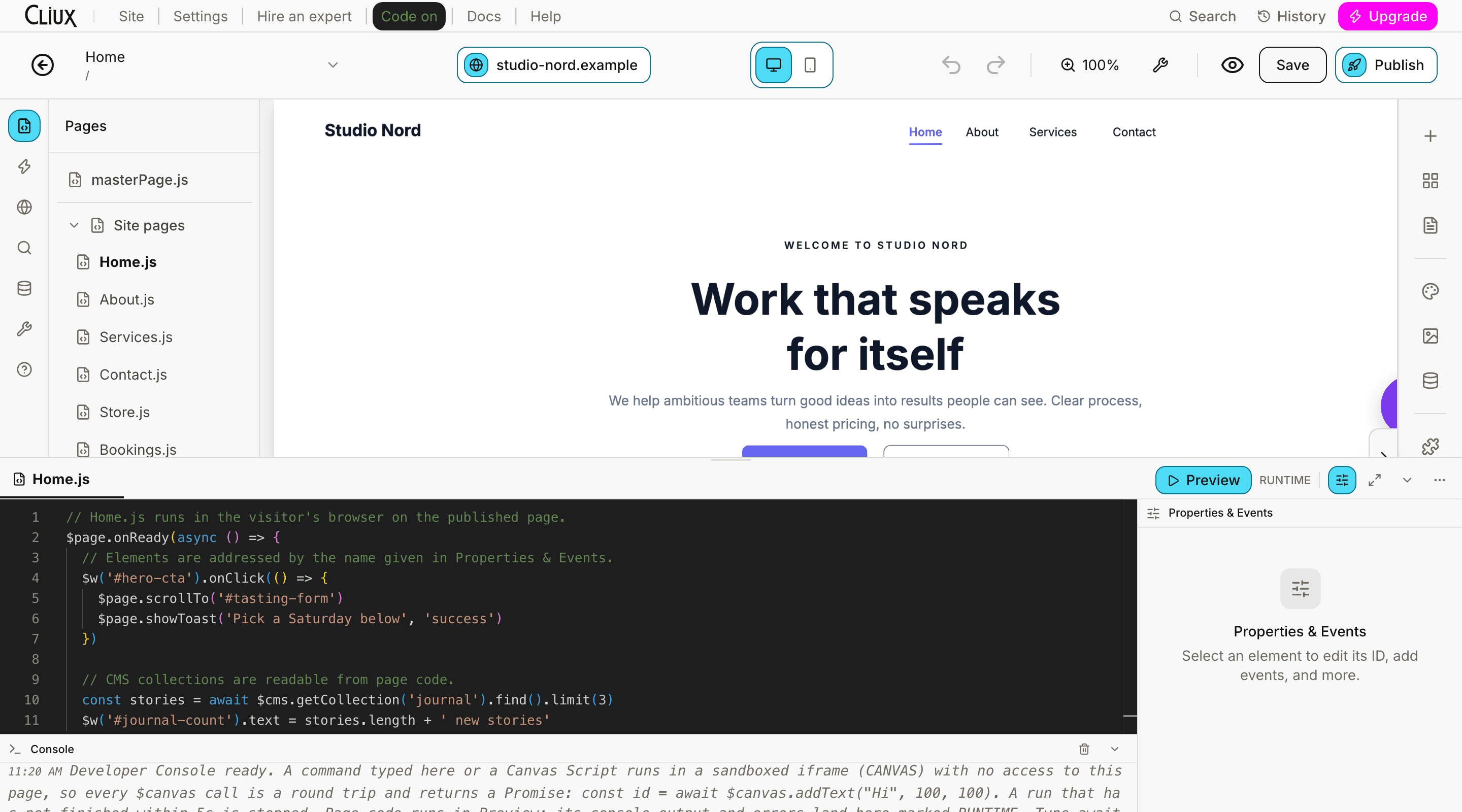
Developer Mode puts JavaScript on a published page: a file per page, elements addressed by name, a read-only view of your CMS, and a canvas API for scripts that edit the design. Agencies can also build plugins for other sites, with a small SDK inside a sandbox. There is no public API or general webhook layer, and this page says so rather than describing one.
- Runtime globals: $w, $page, $cms, $http, $router, $user
- 6
- Element events you can handle
- 12
- Canvas methods for scripts that edit the design
- 33
Counted in the runtime, not estimated.
What you can build today
Code where the page is, and the ways data leaves.
Six things a developer can do on a Cliux site right now. Each is in the product, not on a roadmap.
Page code in the visitor's browser
Each page has its own script and masterPage.js runs on every page. Code runs on the published site, sandboxed, with the runtime globals the facts above count.
Your CMS, read-only
Find, filter, sort and count items in a collection from page code. Writes stay in the editor, so a script cannot corrupt a collection.
Canvas scripts
Scripts that edit the design itself through a sandboxed canvas API, under a time budget so a loop cannot hang the editor.
HTML and website embeds
Paste a provider's embed code into an HTML embed, or put another site in a frame with the website embed, both sized on the canvas like any element.
A webhook per form
Every form can POST its submissions as JSON to a URL you give it, with an email notification beside it. That is how data leaves the site today.
Tracking ids, behind consent
A GA4 measurement id and a Meta Pixel id per site, loaded on the published pages only after the visitor accepts the consent banner.
Plugins
Build a plugin other sites install.
Any agency can build plugins for the plugin market once its owner accepts the developer agreement. A plugin is a bundle of HTML, JavaScript and CSS: a widget a site owner drags onto a page, a screen of its own in the site console, or both.
- Sandboxed, always
- Plugin files are served from a host of their own and run in a sandboxed frame with no access to the site, the console or the visitor's session. Every server a plugin contacts is declared in its manifest and enforced by the browser.
- A small SDK in the frame
- Your pages load the SDK script and talk to the page around them over one channel: context.get, settings.get and settings changes, storage get, set, delete and list, ui.resize, ui.openLink, and token.get on the console screen.
- A signed token for your server
- The console screen can ask for a short-lived signed token naming your plugin, the install, the version and what it runs as (free, trialing, active, grace or test), with the site and the person as pseudonyms that differ for every plugin. Verify it against the published keys.
- Reviewed before it runs
- Every version is read by the review team before it runs on any site but your own, where you can test it first. A version is immutable once uploaded, and an update that asks for more than a site agreed to waits for its owner.
- Free or paid
- A plugin is free, or a subscription per site paid to your own Stripe account, monthly or yearly, with an optional trial. The terms are in the developer agreement your agency's owner accepts.
- Tracking, with consent
- A plugin that measures visitors says so in its manifest, waits for the visitor's consent on the published site, and measures only when its context says the page is published, never in the owner's editor or previews.
Not today
What is not here, said once.
A wrong instruction is worse than a missing one. These do not exist, and nothing on this site says otherwise.
- A public API or API keys
- No REST or GraphQL endpoint answers for your data, and there is no screen that issues a key.
- A general webhook layer
- Forms post their submissions; orders, bookings, members and contacts do not fire events anywhere yet.
- A package to install
- Page code is written in the editor and runs from there, and the plugin SDK is a script your plugin loads from Cliux: nothing comes from npm.
- Server-side code
- Page code runs in the visitor's browser. Running it on the server was built up to a point and deliberately stopped; it is dormant, not shipped.
- An MCP server or an agent surface
- No machine-facing interface exists; the editor is the only way in.
Last reviewed against the code on 30 September 2026. If this page is months old and still says the same thing, that is the honest answer rather than a stale page.
Frequently asked questions
Have other questions? Write to [email protected], orUse the contact form
No public one. There is no endpoint for your site's data and no API key; the one SDK is the plugin SDK, which works inside a plugin's sandboxed frame. If you would build something against an API, the contact form is the place to say what; an integration nobody asked for is the slowest way to learn what an API should be.
Address elements by name and handle their events, read your CMS collections, react to the page lifecycle, and, in the editor, run canvas scripts that change the design. The Code Editor page lists the runtime globals, the events and the canvas methods.
A form can POST every submission as JSON to a URL you give it and email you at the same time; the forms inbox exports CSV. Orders, bookings and members are read in the console today, not pushed anywhere.
Through the HTML embed element, and for GA4 and the Meta Pixel through the tracking fields on the SEO screen, which load only after consent. There is no site-wide head or footer code field.
Tell us
Tell us what you would build.
Building and previewing costs nothing. Publishing on your own domain is $192 a year on the Website plan, and selling starts on Business.