

Portfolio website builder
A portfolio website builder that starts your site with Home, Work, About and Contact pages.
Choose the Portfolio site type and a theme, and the wizard creates those pages for you. Show each project in a masonry grid, a collage or a slider, receive enquiries through the contact form, and add bookings or a blog when you need them.
Start from a real page
Three portfolio templates, previewed live.
A portfolio starts with 4 pages: Home, Work, About and Contact. Hover over a card to scroll its preview; open one to browse the whole site on a desktop or a phone.
- Design themes
- 11
- Templates, each previewed live
- 121
These figures are counted from the product.
What you get
The builder's main features
Masonry grids, collages and sliders
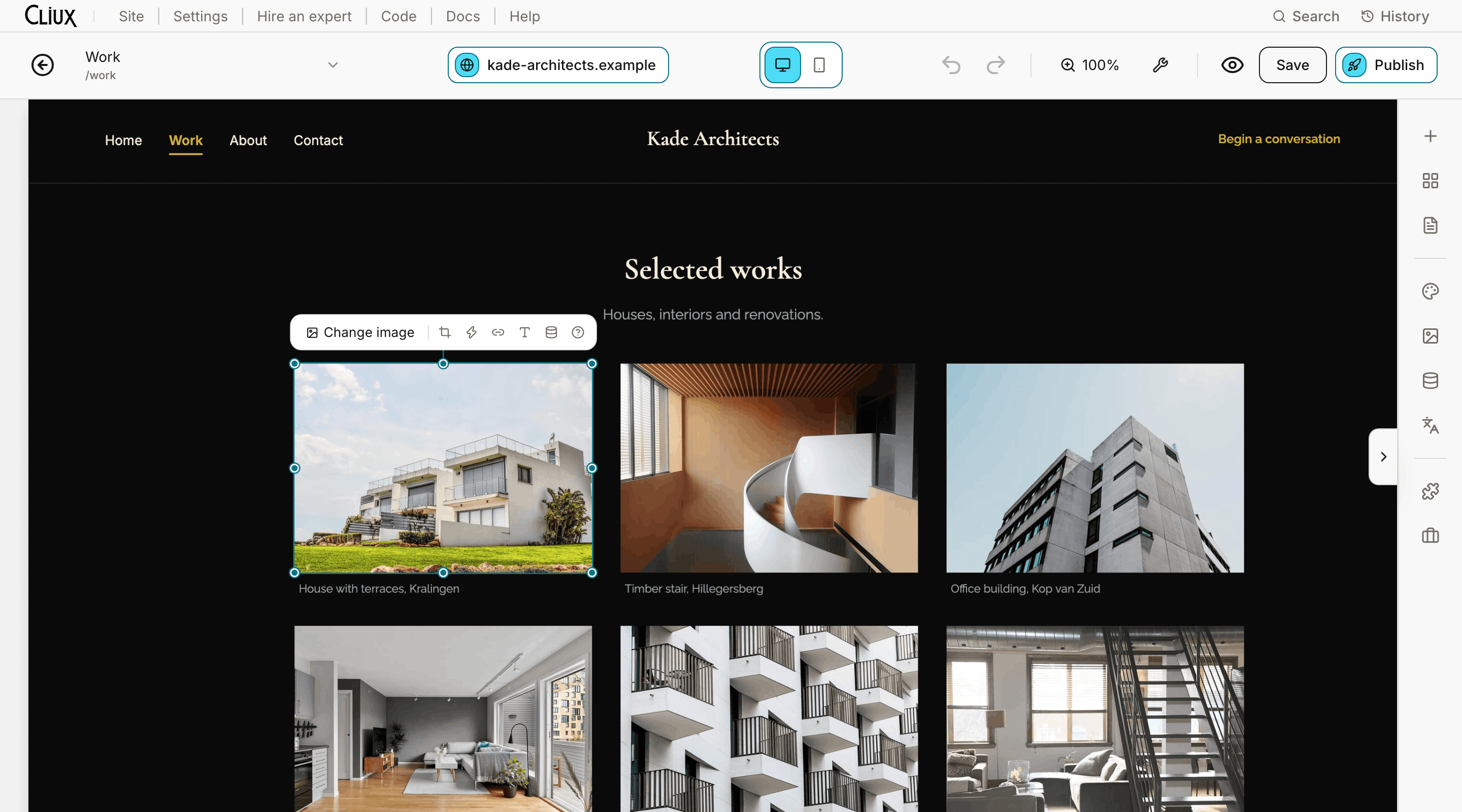
Place a gallery from Insert as a masonry grid, a justified grid, a grid of two to four columns, a collage, polaroid frames or a portfolio grid with titles, or as a slider, a carousel, a thumbnail slider or a fade slider.
A Work page included
The Portfolio site type starts with Home, Work, About and Contact in your theme, and the Work page holds sample pictures with captions for you to replace. Add a page for each project and link to it from the Work page.
Themes with their own layout
When the site is created, each theme gives it its own header, opening section and mix of sections. Switching themes later in the editor's Theme panel changes colours, background and fonts across the site and keeps your layout.
Enquiries from the contact form
With the Forms app, which the wizard preselects for a portfolio, each message sent from the Contact page arrives in Submissions with the page it came from, and a sender with a new email address is added to your contacts. A form you start blank has "Create a contact" off; switch it on in the form's settings.
Bookings for calls and sessions
Install the Bookings app and it adds a Bookings page to the site. Set your services and hours; a booking can be free, or paid in full or with a deposit through the payment provider you connect (Stripe, PayPal and others). Paid bookings need a plan that takes payments.
Your own domain
Connect a domain you own (one with your name, for example) with two DNS records; the SSL certificate is issued and renewed for you.
Frequently asked questions
Have other questions?Use the contact form
Yes. Add a page for each project, put a gallery and text on it, and link to it from the Work page.
Yes. The Masonry gallery lays pictures out in columns of varying heights, each picture in its own shape. The Justified gallery sets them in rows of one height instead, each picture as wide as its shape needs.
Yes, with the Bookings app. You set up a service and your hours; the client books it for free, or pays a deposit or the full price through the payment provider you connect (Stripe, PayPal and others).
Yes. Choose another theme in the editor's Theme panel: colours, background and fonts change across the site, and your pages, sections and galleries stay where you put them.
Building and previewing the site is free. Putting it live, at its Cliux address or on your own domain, needs a paid plan for that site; the pricing page lists the plans.
Get started
Build your site for free. Publish it when it is ready.
Building and previewing are free. Publishing a site, at its Cliux address or on your own domain, is $192 a year on the Website plan, and selling starts on the Business plan.