

Forms and submissions
Build the form on your page. Read every submission in one inbox.
Sixteen field types with validation, file uploads, spam defence and an inbox with CSV export. Each submission can create a CRM contact, email you and the sender, and go on to a signed webhook, a Slack channel or a Google spreadsheet.
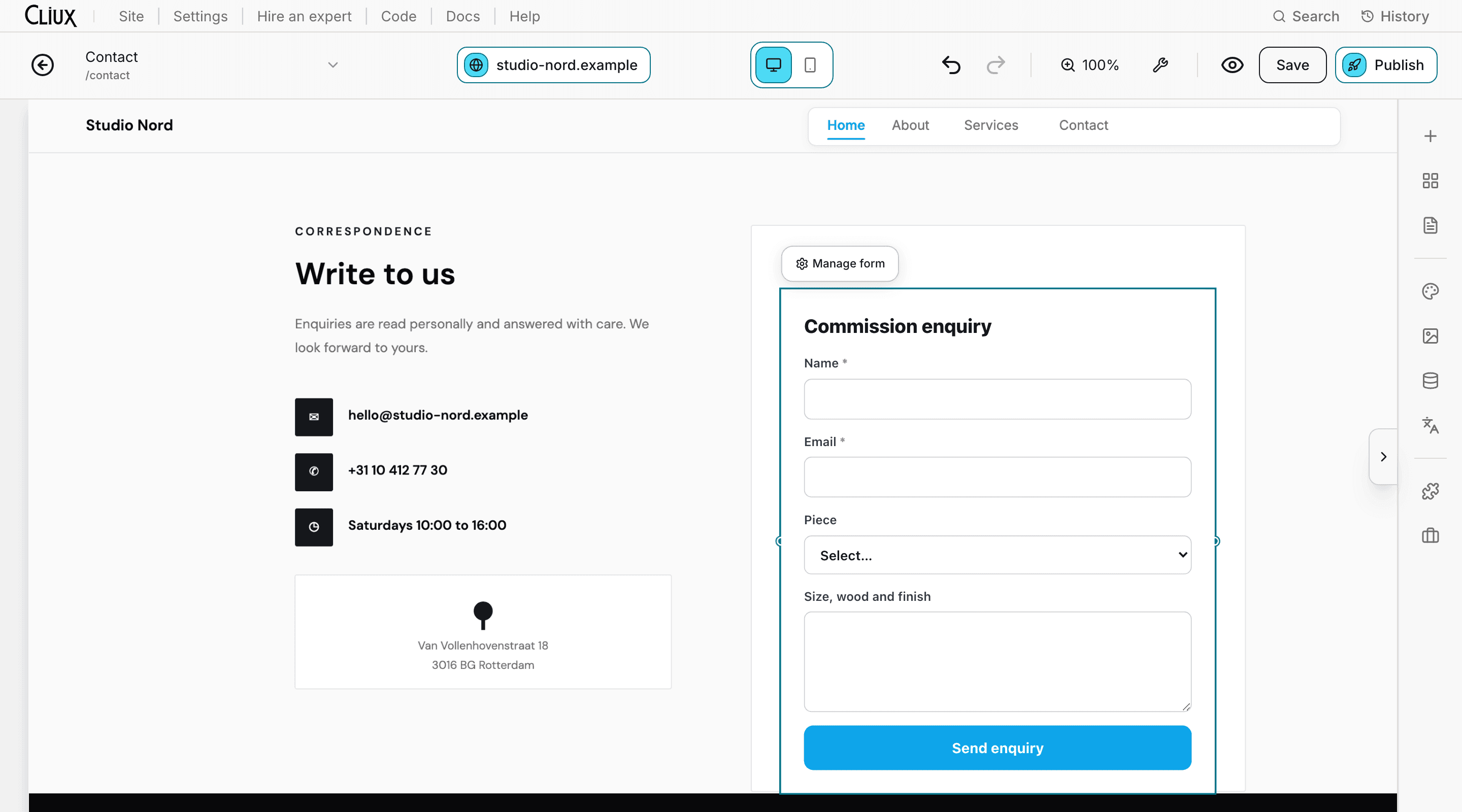
The inbox
Every submission kept, searchable and exportable.
Submissions land in an inbox with read and unread status, a spam toggle that keeps the message recoverable, bulk actions and CSV export. Set a retention period and old submissions are deleted for you.
Spam defence in layers
A honeypot, a rate limit and a spam score on every form, with nothing to set up.
File uploads
Accept files up to 8 MB each, and choose the allowed file types per field.
Retention you set
Keep submissions for the period your policy sets; older ones are deleted automatically.
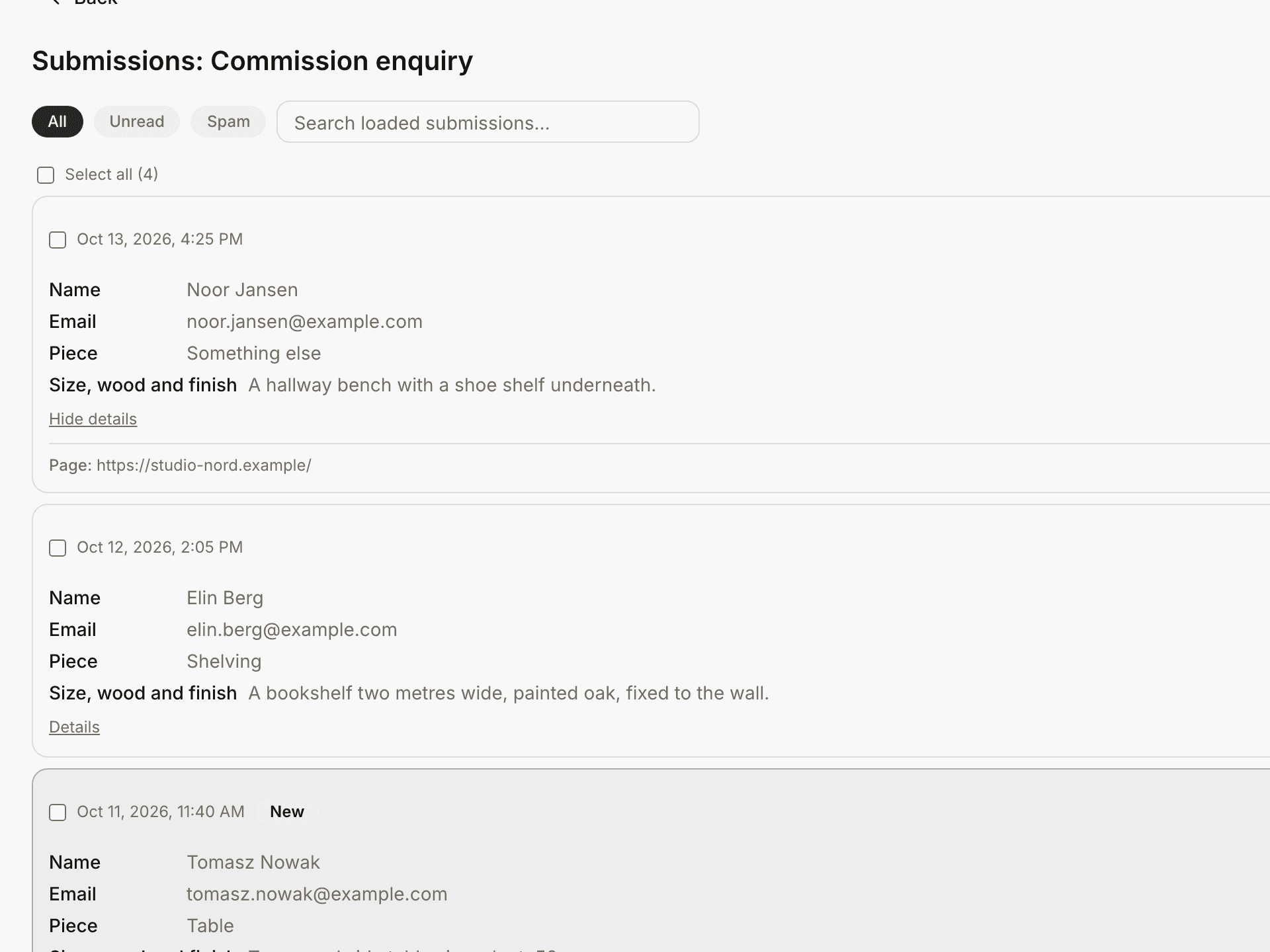
After the submit
A submission becomes a contact, an email, a webhook call.
Turn on "create contact" and every submission is a person in your CRM. Send yourself a notification and the sender an autoresponder with a copy, redirect to a thank-you page, and send each submission on to your own endpoint, a Slack channel or a Google spreadsheet.
Straight into the CRM
Name, email and phone become a contact you can follow up.
Two emails per submit
A notification to you, an autoresponder with the summary to the sender.
Webhook, Slack and Google Sheets
Each accepted submission goes to the connections you add; a failed delivery is tried again, and internal and private network addresses are refused.
- Field types
- 16
- Fields per form
- 40
- Options per choice field
- 30
- Per uploaded file
- 8 MB
These figures are counted from the product.
Capabilities
What you get
Building and previewing are free. Publishing takes a site plan; taking payments starts on Business and recurring payments on Business Plus.
Sixteen field types
Text, email, phone, number, long text, select, country, radio, checkbox, checkbox group, date, time, rating, consent, file and hidden.
Validation per field
Required, min and max length, min and max value, a pattern, allowed file types, a star count.
Success message or redirect
A success message or a redirect URL, per form.
Submit from another site
The submit endpoint accepts your form from an external site too.
The same fields in bookings
A booking intake form is built from the same field types, so it works the way your other forms do.
CSV export
Download the inbox as a CSV file.
Go deeper
More on Forms
Frequently asked questions
Have other questions?Use the contact form
Yes. A field can be shown only when an earlier answer calls for it, and a long form can be split into steps with a progress bar. The server applies the same rules, so a hidden field is never required, and without JavaScript every step opens on one page.
Three layers on every form: a honeypot field, a rate limit and a heuristic score. A submission scored as spam is kept, marked, and can be restored with one click.
To the platform's file storage, recorded against your site, up to 8 MB per file and only the types your accept list allows. The address of each file is shown with the submission in the inbox and in the CSV export.
Yes, if you turn it on. Switch on the owner notification, and optionally a confirmation email that sends the sender a copy of what they submitted.
Yes. In the form's Connections you can add a signed webhook that posts each submission as JSON to an https address you set, a Slack channel, or a Google spreadsheet that gets a row per submission. A tool that accepts webhooks can receive submissions through the signed webhook; there are no built-in connectors for mailing lists or CRMs.
Yes, for short surveys: rating fields with the star count you choose, single and multiple choice, and long text make a feedback form, and the answers export as CSV. A question can follow from an earlier answer, and a survey and a feedback form are among the templates a new form can start from. A dashboard that sums up the answers is not currently available.
Get started
Try Forms for free.
Building and previewing are free. Publishing a site, at its Cliux address or on your own domain, is $192 a year on the Website plan, and selling starts on the Business plan.