

Tracking
The Meta Pixel on your published site, with the visitor's consent.
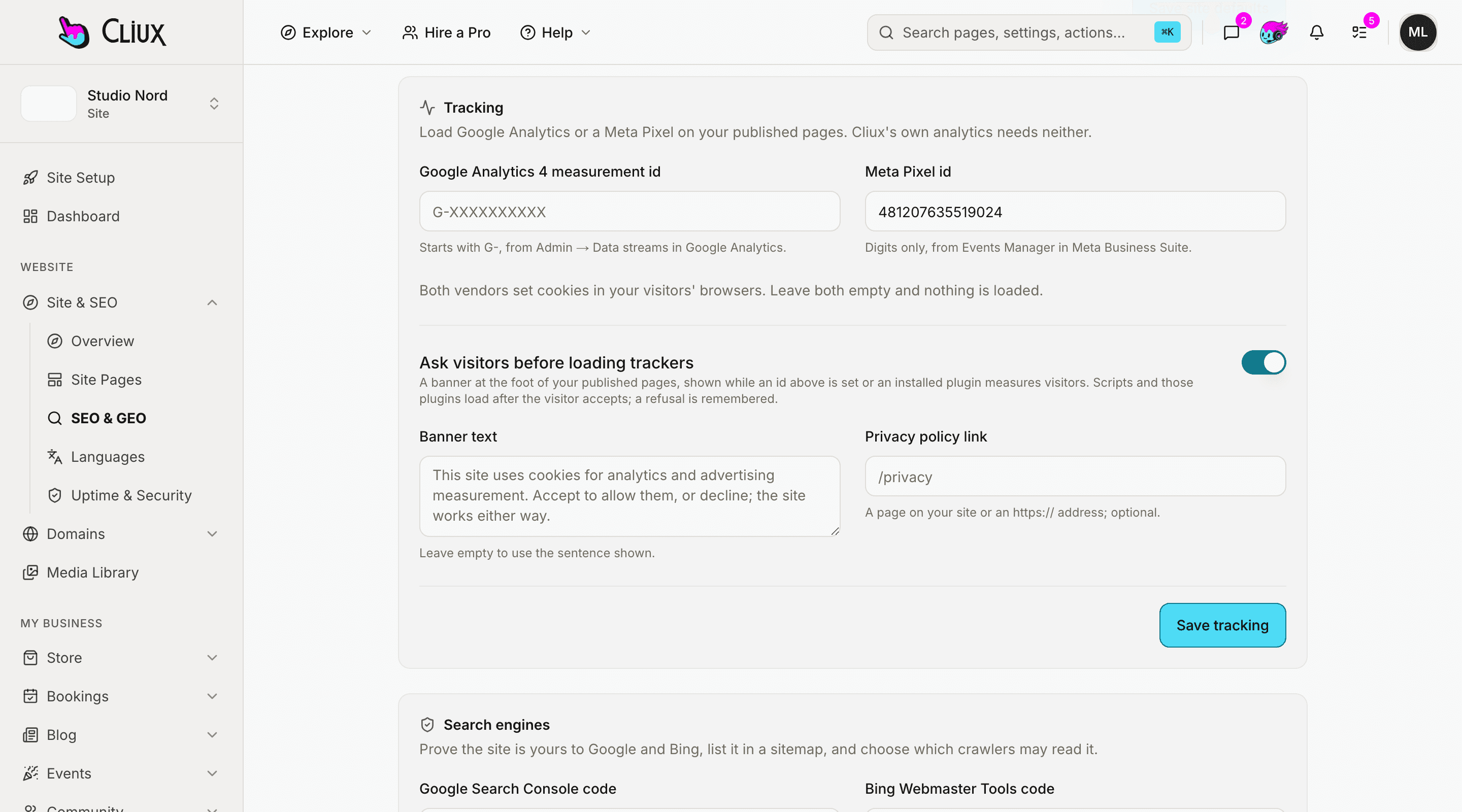
Paste your Pixel id under SEO & GEO. Your published pages load Meta's script after the visitor accepts the consent banner, and send one PageView event per page load.
How you connect
Where Meta Pixel is switched on
The screen, the path to it in the sidebar, and what happens when you press the button. Nothing else to install.
Site console
- Site & SEO
- SEO & GEO
Press Save tracking. The Tracking card takes the Pixel id (digits only, from Events Manager) and refuses anything else. The next visit to the published site carries it.
Consent first
The pixel loads only after the visitor accepts.
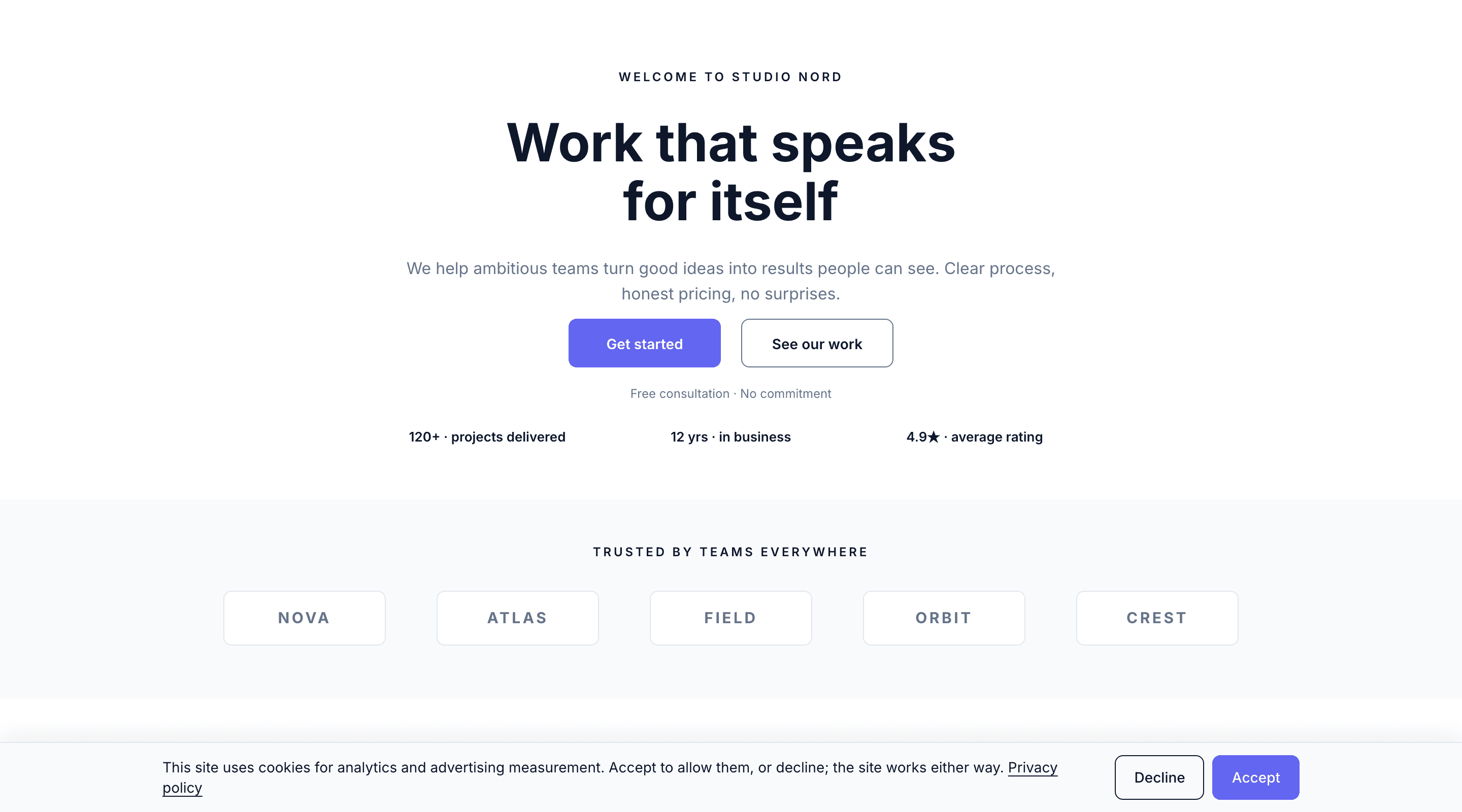
The Meta Pixel sets cookies, so while an id is set your published pages show a consent banner at the foot of the page, unless you switch the banner off. Accept loads the pixel on that page and sends a PageView; Decline is remembered and nothing loads. Cliux's first-party analytics sets no cookie and counts visits whatever the visitor answers.
Shown only while a tracker is active
The banner appears while a tracking id is set or an installed plugin measures visitors. Clearing the Pixel id stops the pixel from loading.
The answer is remembered
The visitor's answer is stored in their browser on your site's domain and is asked for again after it expires.
Your own text and privacy link
Write the banner text and link to your privacy policy, or keep the default text.
- Days a visitor's answer is kept
- 180
These figures are counted from the product.
What you get
Meta Pixel with Cliux
One field, a Pixel id
The numeric id from Events Manager. An id with anything other than digits is refused before it is saved.
Loads after consent
While the banner is on, fbevents.js is added in the browser once the visitor accepts, and not before.
One PageView per page load
Each time a published page loads, the pixel sends the standard PageView event once. Moving between member pages without a reload sends no new PageView.
Every published page
The home page, site pages, blog posts and member pages carry the same pixel; there is nothing to place per page.
Alongside first-party analytics
Cliux's own traffic and realtime view keep working with or without the pixel.
Removed by clearing the field
Remove the id and save: from the next visit the pixel no longer loads, and the banner is removed unless another tracker still needs it.
Not included
Not currently available with this connection
If you need one of these, let us know through the contact form. We prioritise this list based on the requests we receive.
- Standard events beyond PageView
- Cliux sends no Purchase, Lead, AddToCart or other standard event beyond PageView, and no custom event. Store orders and form submissions are not sent to Meta.
- Conversions API
- There is no server-side relay to Meta; the pixel runs in the visitor's browser only.
- Catalogue sync
- Store products are not exported to a Meta catalogue.
- Advanced matching
- No visitor data (email, phone) is passed to the pixel.
- Consent signals
- Cliux does not send Meta a consent flag. While the banner is on, it does not load the pixel until the visitor accepts.
Frequently asked questions
Have other questions?Use the contact form
In the site console under Site & SEO → SEO & GEO, in the Tracking card, beside the Google Analytics field. Save, and the next visit to the published site carries it.
Yes, while an id is set and the banner is switched on, which is the default. The pixel sets cookies, so the site asks first. You can switch the banner off in the same card; the pixel then loads when the page opens, and obtaining consent is your responsibility.
PageView, once per page load, after the visitor has accepted. Cliux sends no other standard or custom event.
No. Orders are recorded on your site and paid through the payment provider you connect. Cliux sends no Purchase event and has no Conversions API relay.
Yes. The two fields sit side by side in the Tracking card, one banner covers both, and each script loads after the visitor accepts.
Get started
Try Meta Pixel on a Cliux site.
Building and previewing are free. Publishing a site, at its Cliux address or on your own domain, is $192 a year on the Website plan, and selling starts on the Business plan.